Druid Portal
The Druid Portal provides an intuitive and easy to use web user interface, the perfect workspace for authoring AI Agents, conversations, and integrations with other platforms and IT systems. It has been designed for AI Agent authoring, packaging many tools in simple environments.
Users with elevated privileges have full access rights while other users have the access rights that have been granted by their administrator based on business need to know. The way you access the Druid Portal depends on how your admin set up user authentication.
At a glance, the Druid Portal contains: a header, a menu and a working area.
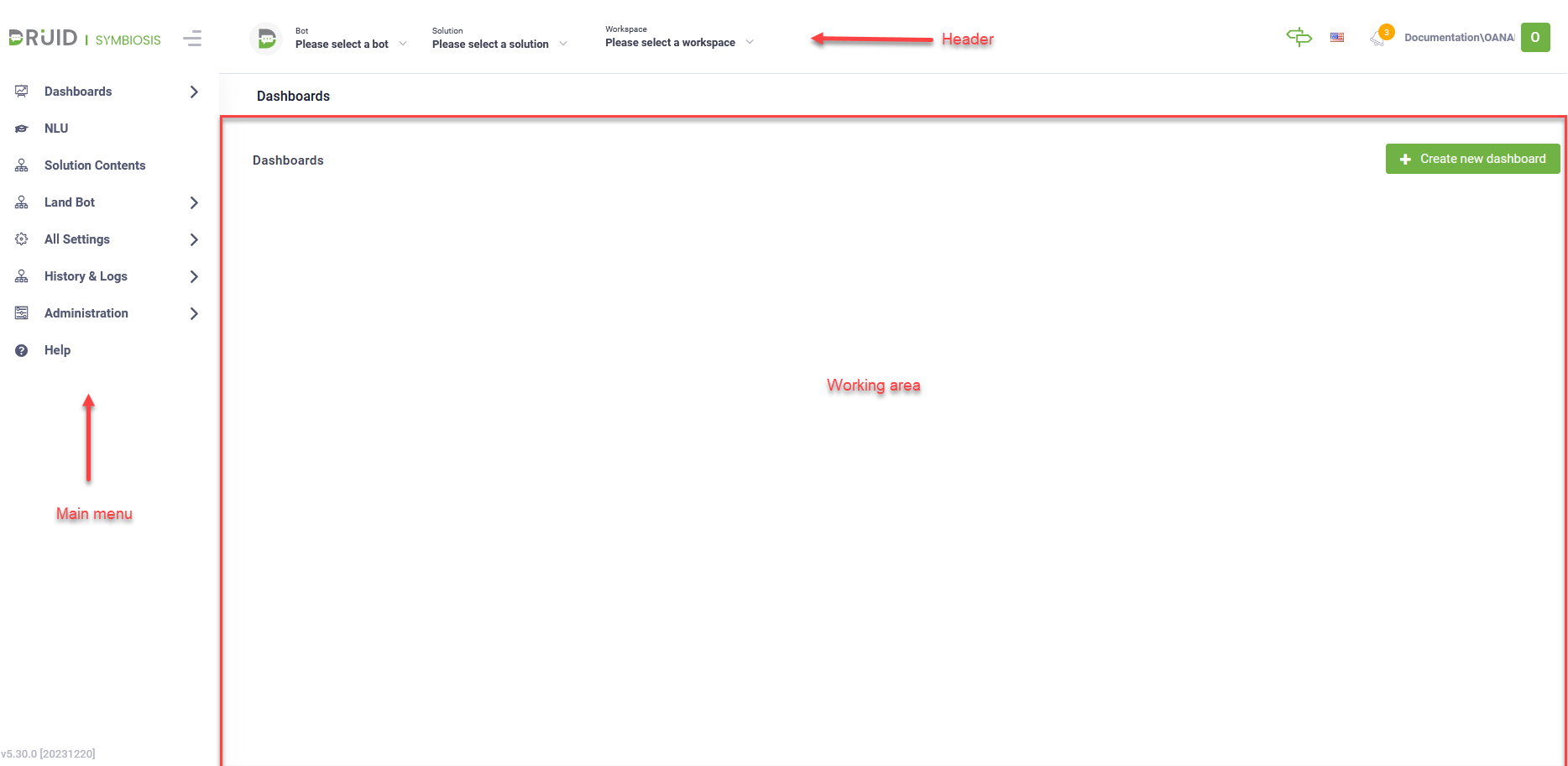
Header (quick context and creation)
The Header contains three key elements that allow you to switch contexts or create new resources:
- AI Agent: This displays your current working AI Agent. To create a new AI Agent, click the dropdown list, select Create AI Agent, and complete the Create New AI Agent modal.
- Solution: Use this to manage and import AI Agent configurations. You can easily export a subset of configurations (like a complete HR AI Agent) and import it into other enterprise tenants (development, testing, or production).
- Workspace: Access digital rooms where business users interact with AI Agents through chat and voice. This also centralizes data coming from various integrated sources. Workspace is a tenant-level feature that requires activation upon request.
Main Menu (core AI Agent functions)
The main menu is where you perform the primary tasks for building and monitoring your AI Agent:
- Dashboards: Monitor the usage and performance of your AI Agent using various reporting tools.
- NLU: Configure, analyze, and enhance your AI Agent Conversational AI (e.g., train intents and optimize language understanding) and Knowledge Base.
- Solution Contents: Quickly access the AI Agent designers specific to the selected solution: Flows, Entities, Integrations, Documents, Apps, and Roles. Access to specific designers may be restricted based on your role.
- Land AI Agent: View the public landing pages for all the AI Agents on your tenant. This is where users can chat with the AI Agents in an authenticated context.
- All Settings: Access global designers and settings that apply across the entire portal. Access to this area may be restricted.
- History & Logs: Review extensive audit logs to track changes and system activity.
- Administration: Manage portal and tenant settings and tools, such as adding new users or configuring system-wide permissions. This is available only to users with elevated privileges.
Working area
The Working Area is your dedicated space to build and manage a single AI Agent and solution at a time. It filters the AI Agent elements so you can focus on creating smooth conversations and seamless integrations.